 sinra
sinra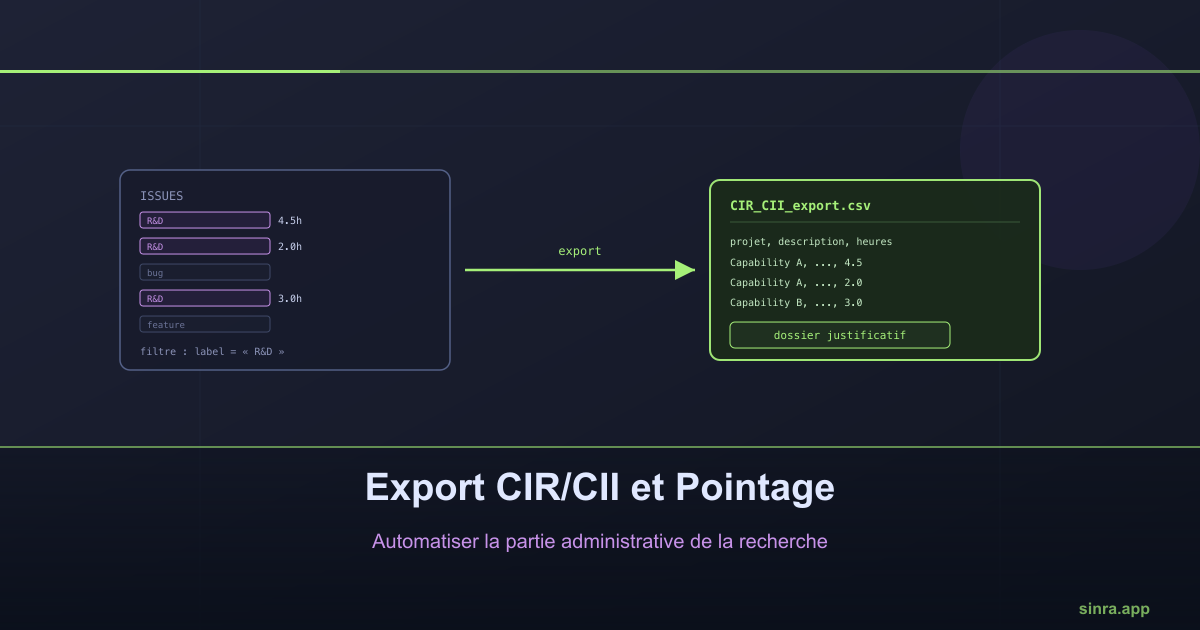
CIR/CII and Timesheet Export: Automating the Admin Side of Research
Rebuilding a CIR/CII supporting file by hand means digging back through a spreadsheet for hours and descriptions your project tool already has. A well-designed export turns days of work into a few clicks.
Every year, companies benefiting from the French R&D Tax Credit (CIR) or Innovation Tax Credit (CII) must produce a supporting file detailing the research work carried out, the time spent on it, and the period covered. In practice, this file is too often built after the fact: someone reopens the year’s tickets, copies hours into a spreadsheet, and tries to work out which tasks actually counted as R&D. That reconstruction work is slow, error-prone, and entirely dependent on the team’s memory.
The problem isn’t tracking, it’s reconstruction
A team using a project management tool already tracks, day to day, everything that matters for the CIR/CII file: the issues worked on, the time spent on each, the capability or project they belong to, their technical description. That information exists. The problem isn’t its absence, it’s that it’s nowhere available in a form usable for a tax filing. Rebuilding a supporting file then means redoing, months later, a compilation job the tool could have produced directly.
What the CIR/CII export does
Sinra’s CIR/CII export starts from that simple observation: the supporting file doesn’t need to be reconstructed, it needs to be extracted. Concretely, the user filters their issues by a label they created themselves — “R&D”, “Research”, or any name relevant to their organization — and by the period concerned, then selects the fields to include: project, technical description, hours worked, dates of the linked capability. The export generates a file with one row per issue, ready to serve as the base for the supporting file.
Choosing a label rather than a fixed technical field is the key decision: the user decides what counts as R&D for their organization, not the tool enforcing a rigid classification. A label can be created, renamed, applied, and removed as easily as a tag, giving the team full control over how it qualifies its own work, year after year.
A timesheet export, for a different need
The same export mechanism serves a second, more general need: producing a simple worked-hours report, by person and by project, with no label filter at all. This format fits a standard timesheet workflow, time-based billing, or internal activity reporting. Exported hours are cumulative per issue, not logged as a daily attendance journal — the file remains an activity report, not a strict clock-in/clock-out record.
What this actually changes
The most visible gain is time: what used to take several days of manual reconstruction at year-end becomes a few-minute export, available at any point in the year. But the more important gain is elsewhere. A file rebuilt by hand depends on what the team still remembers; a file extracted directly from real tracking reflects what actually happened, with descriptions and dates as they were entered at the time the work was done, not as they get reconstructed six months later. That continuous traceability is exactly what a tax audit or internal review is looking to verify.
Other uses for the same mechanism
The same export, applied to different labels or filters, covers needs well beyond CIR/CII:
- Time-based billing for client work, filtering issues by project rather than by an R&D label.
- Monthly reporting for a steering committee, combining a period filter with a field selection geared toward summary rather than technical detail.
- Quality or compliance audits, isolating issues carrying a specific label tied to a standard or certification tracked over time.
- Budget allocation across multiple projects, cross-referencing the export with hours per capability to support a resourcing decision.
In every case, the principle stays the same: rather than building a dedicated report for each administrative need, a single export mechanism, combined with the filters and labels the team defines itself, adapts to whatever’s needed without further development.
What to take away
The CIR/CII file, like most recurring administrative reports, has no reason to be rebuilt by hand at every deadline. If a project management tool already tracks what matters — issues, hours, projects, labels — the right question isn’t “how do we reconstruct this report” but “why isn’t it already available as an export.” That’s the question Sinra’s CIR/CII and timesheet export was built to answer.
Ready to Transform Your Project Management?
Apply these insights with Sinra - the unified platform for modern teams.
Start Free Trial