 sinra
sinra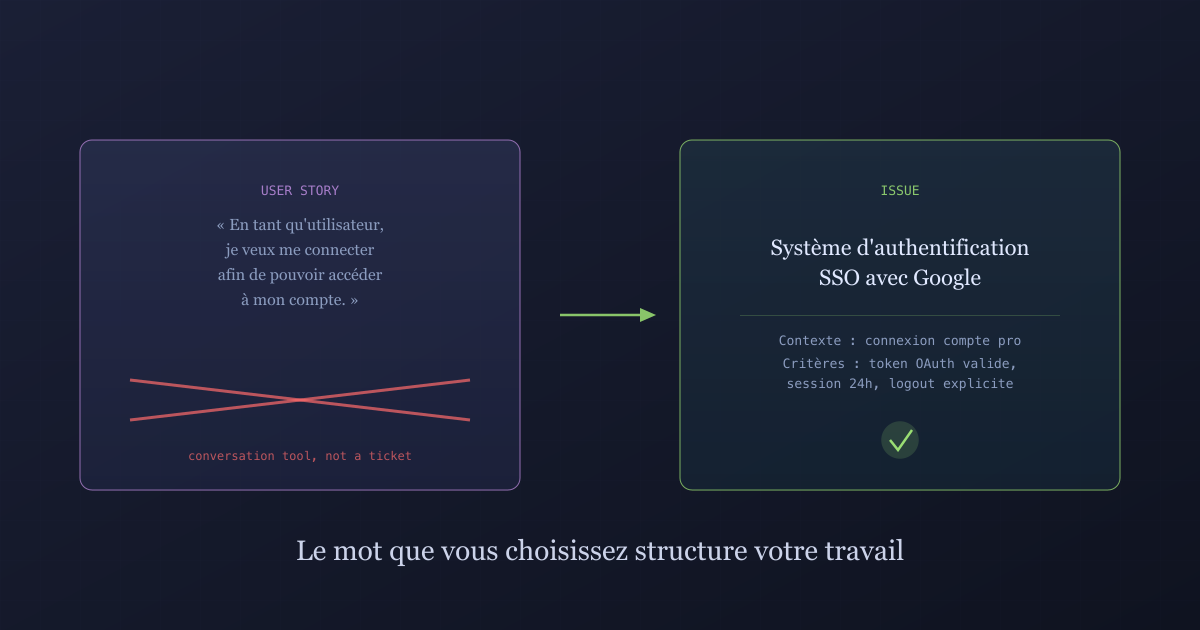
A user story is not a ticket: why the words you choose shape your work
As a… I want… so that… This format conquered the development world. It also produced unreadable backlogs, endless semantic debates, and teams that no longer know what they're actually delivering.
Somewhere in a Jira backlog, there is a ticket titled “As a user, I want to be able to reset my password so that I can regain access to my account.” It is estimated at 3 story points. It is assigned to a developer. It has been marked as blocked for three sprints because no one has defined what “regain access” actually entails: do we send an email? An SMS? Both? What happens if the email address is no longer valid?
The ticket looks complete. It follows the format. It has a subject, a verb, a goal. And yet it says nothing about what the developer needs to do.
That is the fundamental problem with the user story as a unit of work.
What the user story was meant to be
The user story was not invented as a ticket format. It was invented by Ron Jeffries and colleagues in the context of Extreme Programming in the early 2000s, as a prompt for conversation.
The original idea: a card (physical, on cardboard) containing just enough information to start a discussion between the Product Owner and the technical team. Nothing more. The card is not the specification. The conversation around the card is.
The “as a… I want… so that…” formulation came later, as a memory aid to structure that conversation. To ensure you think about who benefits from the feature, what it enables them to do, and why.
This format made sense in that context. It makes far less sense when it becomes the title field of a Jira ticket that someone reads six weeks after the conversation took place, without having attended the discussion, without knowing what was decided afterward.
The semantic drift
At some point that is hard to pinpoint precisely, something changed.
The user story shifted from a conversation tool to a delivery unit. The discussion card became the work ticket. And the “as a… I want… so that…” formula became a mandatory field to fill in, enforced by Jira plugins that reject titles not beginning with “As a.”
This shift produced several perverse effects.
Mechanical filling. When a format becomes a requirement, people comply without thinking. “As an admin, I want to be able to access the admin dashboard so that I can administer the system.” That ticket says nothing. It follows the formula. It is in the backlog anyway.
Loss of technical precision. The user story, by design, describes a user need. It does not describe a technical solution. That is its value for product-development conversations. It is also its flaw as a work ticket: the developer must guess or reinvent each time what it actually implies in practice.
Unproductive semantic debate. “This ticket isn’t really a user story, it’s a technical task.” “Technical tasks should be broken down under user stories.” “But then how do we estimate epics?” Hours of meetings spent organizing the backlog rather than doing the work.
What an issue says that a user story does not
An issue, in the literal sense, is something that needs to be resolved. A problem, an improvement, a task, a bug. The word is neutral, direct, with no imposed format.
What this changes in practice:
An issue can be called “Email-based password reset system.” It describes what needs to be done, not who benefits from it. It leaves room for technical details. It can have a description that mixes user context with implementation constraints.
It does not require finding a valid subject (“as a system administrator with level-3 permissions…”). It does not force you to justify its existence in the format (“so that I can manage access…”). It says what it is.
An issue can also describe something with no direct end user: a database migration, a dependency update, configuring a CI pipeline. Trying to squeeze this work into the user story format produces absurd results. “As a developer, I want to update the Node.js version so that I continue to receive security patches.” Yes. Or you can just write: “Update Node.js to version 22 LTS.”
The problem with acceptance criteria
User stories typically come with acceptance criteria. This is often the most useful part of the ticket, and also the part that teams write least well.
Acceptance criteria are supposed to define what constitutes a successful implementation. When done well, they supersede the user story description entirely. They say what the system must do under specific conditions.
The problem: teams using the user story format often have an inverted relationship between these two elements. The “as a…” title receives considerable attention when the ticket is created. The acceptance criteria are added quickly, vaguely, or not at all.
What you often find: a perfectly formatted title, and criteria like “The user can reset their password” - which says nothing more than the title.
Naming as a precision tool
There is something non-trivial about naming work units correctly.
A backlog composed of clearly named issues allows someone who did not attend the conversations to understand what has been delivered, what is in progress, and what remains to be done. It allows you to search for tickets without remembering the exact subject. It allows a new team member to get oriented.
A backlog of user stories titled “As a user, I want to…” does not offer these properties. You have to open each ticket to understand what it is about. You need to know the context of the conversation to interpret what was planned.
Naming is implicit documentation. A well-named ticket documents its contents by itself. A poorly named ticket needs to be opened and read in full every time.
The granularity question
One of the recurring sources of confusion in teams that use user stories is the question of abstraction level.
The user story is supposed to live at a medium level of granularity: precise enough to be estimated and planned, abstract enough to remain centered on user value. Above it sit epics. Below it, tasks.
In practice, this hierarchy creates more problems than it solves.
Epics are often too large to plan but too small to serve as strategic objectives. Tasks are often redundant with user story acceptance criteria. And user stories themselves oscillate between very different levels of granularity depending on the team and the moment.
A more direct hierarchy: capabilities for high-level features, issues for day-to-day work. No imposed format, no abstract granularity rule. Granularity is defined by what is useful to plan and track, not by a naming convention.
What this says about the organization
The way a team names and structures its backlog says something about how it thinks about its work.
A team that uses user stories as tickets is often one where product responsibility and technical responsibility are strongly separated. The Product Owner creates user stories focused on user needs. Developers break them down into technical tasks. Testers verify acceptance criteria.
This model has its merits in very large organizations. It has its drawbacks in teams where product and engineering work in close collaboration: it creates intermediate artifacts that have no value in themselves.
A team that uses direct issues is often one where responsibility is more fluid: developers understand the user need, the Product Owner understands technical constraints, and the ticket does not need to play the role of translator between two worlds.
Keep the conversation, drop the format
What was valuable about the user story was its insistence on the “why.” On value for the user. On the idea that every backlog item should have a beneficiary and a purpose.
That insistence is precious. It prevents building orphaned features, impact-free optimizations, tickets that exist because someone had an idea on a Tuesday.
What to keep: the discipline of “why.” Every issue should be able to answer the question: who does this serve, and what for?
What to abandon: the rigid “as a… I want… so that…” format as the mandatory title structure. This format constrains thinking into a mold that does not match the diversity of real work.
Writing “SSO authentication system with Google” and noting in the description “Context: users need to log in with their professional Google account, reducing internal passwords to manage” is infinitely more useful than a perfectly formatted title that says nothing about what needs to be done.
The signal that words send
There is one final aspect that is often underestimated: the signal that vocabulary sends to the team.
“User story” says: this ticket exists to serve a user. It is a constant reminder that the work has a meaning external to the technical team.
“Issue” says: there is something to resolve. It is more neutral, but also more honest about the diversity of real work: not everything a technical team must do directly serves an end user, and pretending otherwise creates unnecessary intellectual contortions.
Both approaches carry a grain of wisdom. What does not work is imposing one format on all of the team’s work, as if the reality of software development could fit into a single narrative structure.
The word you choose to describe your work is not a cosmetic detail. It structures how you think about what you do, how you communicate with others, how you find information six months later.
A user story is a conversation. An issue is work to be done. Conflating the two does not produce better software. It just produces harder-to-read backlogs.
Ready to Transform Your Project Management?
Apply these insights with Sinra - the unified platform for modern teams.
Start Free Trial